Yaarwin Deposit & Withdraw Guide
Learn how to deposit, withdraw, check payment methods, and solve common transaction issues on Yaarwin Games.
How to Deposit on Yaarwin

Depositing on Yaarwin is designed to be simple. Users can add funds by opening the wallet section, selecting a payment method, entering the amount, and confirming the transaction.
- Log in to your Yaarwin account.
- Open the wallet or deposit section.
- Choose your preferred payment method.
- Enter the deposit amount carefully.
- Follow the payment instructions and confirm the transaction.
- Check your balance after the deposit is completed.
How to Withdraw on Yaarwin
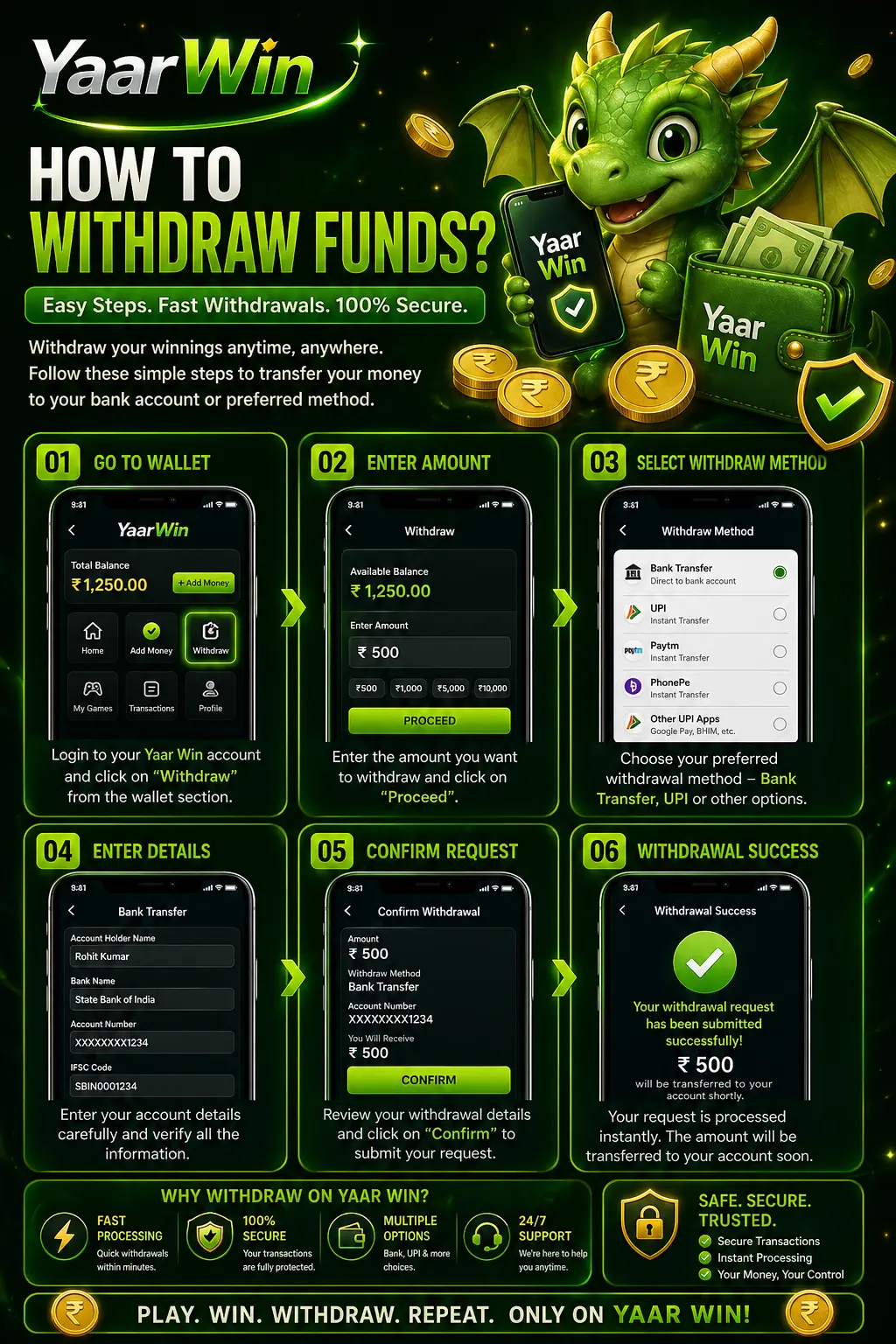
Withdrawals allow users to request available balance from their Yaarwin account. Before submitting a withdrawal request, make sure your account details and payment information are correct.
- Log in to your Yaarwin account.
- Open the wallet or withdraw section.
- Select your withdrawal method.
- Enter the withdrawal amount.
- Fill in the required payment details correctly.
- Review the information and confirm the request.
Available Payment Methods
Yaarwin may provide different deposit and withdrawal methods depending on account settings, region, and platform availability. Users should always follow the latest payment instructions shown inside their account.
USDT payments may be available for users who prefer crypto-based transactions. Always check the network, wallet address, and amount carefully before confirming any USDT payment.
Deposit and Withdraw Tips
A few simple checks can help users avoid payment delays and transaction mistakes.
Transaction Processing Time
Deposit and withdrawal processing time can vary depending on the selected method, system status, and account checking process.
Deposits are usually processed faster, while withdrawals may take longer because they can require extra review. If a transaction takes longer than expected, users should check the payment status and contact support with clear proof.
Common Payment Problems and Solutions
Check proof and contact support.
Wait for review and confirm details.
Contact support immediately.
Check network and wallet address.
Retry only after checking status.
Refresh account or ask support.
Safe Payment Practices
Payment safety is important when using any online platform. Users should only follow official instructions, avoid unknown links, and never send funds to unverified accounts.
For USDT payments, always confirm the correct network and wallet address before sending. Crypto transactions may be difficult to reverse if sent incorrectly.
Deposit and Withdraw FAQ
How do I deposit on Yaarwin?
Log in to your account, open the deposit section, choose a payment method, enter the amount, and follow the instructions shown on the page.
How do I withdraw from Yaarwin?
Open the withdraw section, select a withdrawal method, enter the amount, fill in the correct payment details, and confirm the request.
Does Yaarwin support USDT payment?
USDT may be available as a payment method depending on account settings and platform availability. Always check wallet address and network details carefully before sending.
Why is my deposit not received?
A deposit may be delayed because of payment checking, wrong details, unstable network, or system status. Save your transaction proof and contact support if needed.
Why is my withdrawal pending?
Withdrawals may need review before completion. Make sure your account details are correct and contact support if the pending status lasts too long.
What should I do if I entered wrong payment details?
Contact support immediately and provide your transaction details. Do not repeat the same transaction before the first issue is checked.
Start Using Yaarwin Payment System
Deposit safely, withdraw carefully, and always check your payment details before confirming any transaction on Yaarwin.